Blog · Competitor research
How to know when competitors kill ads
Killed ads show what a competitor tried and dropped, but ad libraries rarely keep them visible. Here's how to catch them by hand, log them over time, and automate it.
By Adflank team ·
How can you tell when a competitor stops running an ad?
Look for ads that were in a platform's ad library last time and aren't now, or read the end date where the library shows one. What each library keeps once an ad stops differs a lot, and in some regions it keeps nothing. None of them covers all four platforms at once.
You don't need a paid tool to start. You do need to know what each library keeps. Say you run a meal-kit brand and a rival's spring promotion has just ended. You want to know which ads they dropped and how long each ran. We checked all four libraries on Nov 9, 2026, and this guide sums up what each one showed.
In this guide:
• What each of the four libraries keeps about stopped ads
• One weekly log that covers all four in a single Google Sheet
• Why the manual method gets hard, and an automated option
• What to look for once you have a few weeks of data
Why does it matter when a competitor stops an ad?
The ads a competitor drops show what they tried and gave up on. An ad that ran for a few days was probably a test. An ad that ran for months was probably worth the money. If one ad ends and a similar one starts the same week, the brand has swapped in a new version of the message.
A stop doesn't automatically mean failure. Promotions end, budgets run out and creatives get rotated on a schedule.
What does the Meta Ad Library keep about stopped ads?
In the EU and UK, switch Active status to inactive and each card shows a start and end date, such as "Sep 24, 2026 - Sep 26, 2026". Meta describes the library as including ads that have run anywhere in the EU in the past year, and in the UK in the past year and after July 1, 2025. An ad that ran only elsewhere isn't in that description, so assume it's gone once it stops.
Watch out for: some inactive cards carry a notice such as "This ad was run by an account or Page we later disabled for not following our Advertising Standards". An ad that ended that way tells you nothing about how it performed.
What does the Google Ads Transparency Center show about stopped ads?
There's no "stopped" label. Each ad shows a Last shown date, and the date presets (Today, Yesterday, Last 7 days, Last 30 days, Any time and Custom) let you compare windows. An ad that appears under Any time but not under Last 7 days hasn't been shown recently. For one large advertiser we saw about 10,000 ads under Any time and about 2,000 under Last 7 days.
Google's FAQ says it keeps ads from verified advertisers for one year after they were last displayed. We didn't open a confirmed stopped ad, so treat a Last shown date as a strong hint, not proof.
What does the TikTok Commercial Content Library show about stopped ads?
Each card shows First shown and Last shown dates. There's no "ended" label, so a Last shown date in the past is your stop signal. The Ad status filter offers All statuses, Active and Inactive, but we couldn't confirm exactly how it decides an ad is inactive, so lean on the dates.
Ads that ran in the EEA, UK, Turkey or Switzerland stay for one year after they were last shown. A US search returned no ads. Dates are in UTC.
What does the LinkedIn Ad Library show about stopped ads?
For ads targeted to the EU and Brazil, the detail page shows "Ran from" and "to" dates, so an end date is there. For other ads there's no run date at all. The only way to catch a stop is an ad you logged earlier that no longer appears. We couldn't confirm whether stopped non-EU ads stay listed, so test it with your own competitor.
How do you log stopped ads across four libraries in one weekly sheet?
Since most libraries don't keep a full history, the reliable method is to take a snapshot of each competitor's live ads every week and compare. A stop shows up as an ad that was in the last snapshot and is gone from this one.
Create a Google Sheet with two tabs. The first, Log, has one row per ad and these columns: Competitor, Platform, Ad ID or link, First seen, Last seen live, Status and Notes. The second, Today, has one column for the ad IDs you see on each check. Use the Library ID on Meta, the creative ID at the end of the ad's address on Google, the Ad ID on TikTok and the ad's link on LinkedIn.
Bookmark one search per competitor per platform. The addresses of all four libraries keep your search and filters. Then run the check on the same day each week:
1. Open each bookmark, with the status set to active ads where the library offers it.
2. Copy every live ad ID into the Today tab, replacing last week's list.
3. Add any ID that isn't in the Log as a new row, with today's date as First seen.
4. In Status, enter =IF(COUNTIF(Today!A:A, C2)>0, "Live", "Gone") and fill it down. A row that flips from Live to Gone is a candidate stop.
5. For each Gone ad, set Last seen live to your previous check date. If the platform shows an end or last-shown date (Meta in the EU and UK, Google, TikTok, LinkedIn in the EU and Brazil), use that instead and note where it came from.
The Notes column is where the log earns its keep. A useful note says what you saw around the stop, such as "spring promo, three variants, all gone the same week". A useless one says "ad stopped". The Status column already tells you that.
Where does the manual method get hard?
A weekly log is fine until you follow more than a few brands. After that, it gets hard.
Count the work. Every check means opening each library, loading the right country, search and filters, copying every live ID into the Today tab, adding new rows and filling the formula down. Five competitors on four platforms is 20 searches per pass, each in a different library.
The libraries also keep different things. Meta keeps inactive ads only for the EU and UK. Google shows a last-shown date and no stopped label. TikTok shows First and Last shown dates in its covered countries and has no US option. LinkedIn shows run dates for EU and Brazil ads only. A competitor who advertises elsewhere leaves nothing to look up.
Time zones don't match either. Google says its data is based on Pacific Time and Meta says its library records dates in Pacific Time, while TikTok and LinkedIn use UTC. An end date can land a day apart depending on where you read it.
The log can't look backwards. It only knows about ads you captured, and a week you skip is a gap you can't fill. A weekly check also leaves every stop a week wide. And nothing alerts you, so you learn about a stop only when you next run the check.
It gets hard when you add brands or platforms, or when you want to know within the day when an ad stopped.
How can you track stopped ads across every platform automatically?
Say a rival's spring promotion has just ended and you want to know what they dropped on all four platforms. By hand that's four libraries that keep different things, with dates in two time zones. An automated tracker does the collecting for you and records when each ad disappears, so a stop is stored as an event instead of a gap you have to notice.
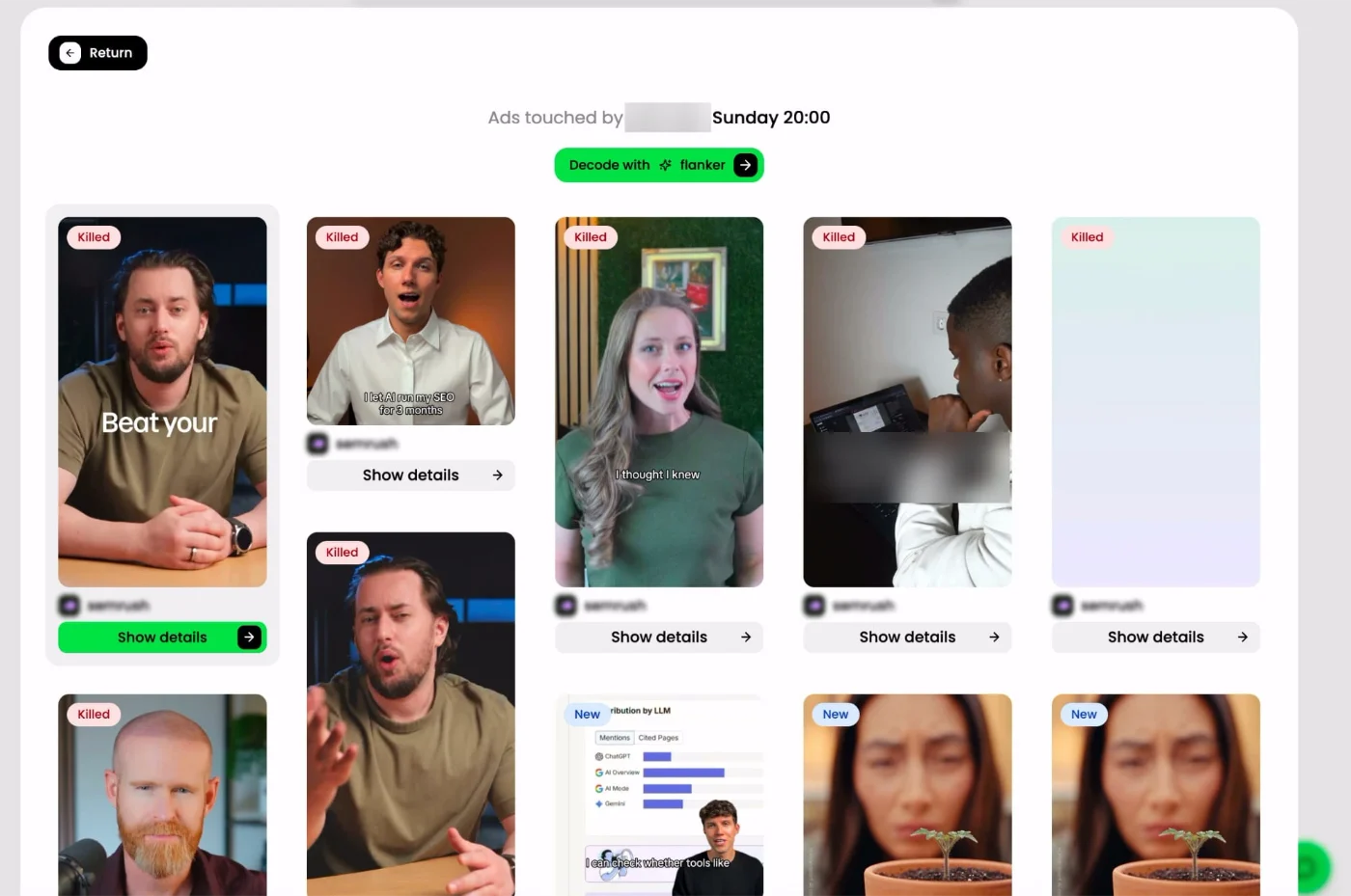
Adflank's Activity Heatmap works this way, and it follows ads on Meta, Google, TikTok and LinkedIn. You open it, pick your rival in the competitor filter and leave the platform filter on All Platforms. A week appears as a grid, with days down the side and two-hour windows across the top. A solid square marks an exact time. A striped square marks the most likely time, because the change was caught between two checks or the time is estimated.
You click a shaded square and see the ads your rival touched in that window, each tagged New or Killed. The Killed ones are the ads they stopped, and the window tells you roughly when. That covers all four platforms in one view, without the weekly pasting.
One limit to know: striped squares are best estimates, not confirmed times.
What should you look for in a competitor's stopped ads?
These checks turn a list of stops into something you can use.
Lifespan. Ads that ended within days were probably tests. Ads that ran for weeks or months were doing something right.
Replacements. A stop and a similar launch in the same period suggests a new version took over. Compare the hook, offer and format.
Clusters. Several ads ending together points to a finished campaign or a strategy change, not creative testing.
Platform differences. An ad stopped on one platform but still live on another tells you where the message works for them.
The landing page. If other ads still send people to the same page, the offer is live and only the creative changed. If nothing does, the campaign has probably ended.
A stop is a clue, not a verdict. Use it to skip the angles competitors drop quickly, to study the ones they kept for months, and to time your own tests around their cycles.