Blog · Competitor research
How to know when competitors launch ads
Ad libraries show what a competitor is running, not when it started. Here's how to check each platform by hand, track launches over time, and automate it.
By Adflank team ·
How can you tell when a competitor launches a new ad?
Check each platform's public ad library, sorted by newest, and compare what's there with what you saw last time. Meta, Google, TikTok and LinkedIn each publish one, and each shows launches differently. None of them covers all four platforms at once.
You don't need a paid tool to start. You do need to know what each library gives you and where it goes quiet. Say you run a meal-kit brand and want to know the day a rival starts a new campaign. We checked all four libraries on Nov 9, 2026, and this guide sums up what each one showed.
In this guide:
• What each of the four libraries shows about launches
• One weekly routine that covers all four in a single Google Sheet
• Why the manual method gets hard, and an automated option
• What to look for once you have a few weeks of data
Why does launch timing matter?
A competitor's launch dates show how they run their marketing, not only what they sell. Some brands add new ads every week. Others launch in bursts around a sale or a product release. If your rival starts a burst of new ads on a Tuesday, you can respond that week instead of finding out a month later.
Several versions of one message launching together usually mean the brand is testing it. Over a few months, the dates also show you the rhythm they work to, so you can plan your own launches around it.
How do you spot new launches in the Meta Ad Library?
Open facebook.com/ads/library, pick a country, choose All ads, type the brand's name and click it under Advertisers in the list that drops down. On the brand's page, set Active status to Active ads and sort by Most recent. Results are grouped under month headings such as "Launched November 2026", and each card shows a Library ID and a "Started running on" date. A Library ID you haven't logged is a new ad.
Two limits matter. For most ads you get a date, not a time, and Meta says an ad can take up to 24 hours to appear. In searches of EU countries, very new ads also show Total active time in hours, which gives you a rough launch hour.
How do you spot new launches in the Google Ads Transparency Center?
Go to adstransparency.google.com, choose your region from the "Ads in" dropdown, and search the advertiser's name or website. Set the date preset to Last 7 days and compare that list with your log. Ads in the short window that weren't in your last check are new.
Watch out for: a website search can return several advertiser accounts for one brand. When we searched a large retailer's domain, Google showed a notice that the domain includes results for multiple advertiser accounts. Check that you're looking at the right one.
What each ad shows depends on the region. In Lithuania we saw First shown and Last shown dates. In the US we saw only Last shown and the format. Google says its data is based on Pacific Time, and ads can take 48 to 72 hours to appear. We found no sort control, so the date presets do the work.
How do you spot new launches in the TikTok Commercial Content Library?
The library at library.tiktok.com/ads needs no TikTok account. Pick a target country, set the Last shown date (the default is the last 30 days) and search by advertiser name or keyword. Each card shows First shown, Last shown and Unique users seen, and you can sort by Publication date or Last shown date. A recent First shown date marks a launch.
The big limit is coverage. The country list covers European countries and Brazil, with no United States option, and a US search returned no ads. If your rival advertises only outside those regions, there's nothing to look up. Dates and time stamps are in UTC, and ads appear within 24 hours.
How do you spot new launches in the LinkedIn Ad Library?
The LinkedIn Ad Library at linkedin.com/ad-library works without logging in. Search by company or advertiser, payer or keyword, choose a country and set a date range: last 30 days, this month, this year, last year or a custom range. You can sort results newest to oldest, but the result cards don't show dates.
To see when an ad ran, open it. For ads targeted to the EU and Brazil, the detail page shows "Ran from" and "to" dates, impression bands and targeting. For other ads you get the format, the advertiser and who paid for it, with no dates. LinkedIn says its dates are in UTC and that ads created on or after June 1, 2023 are searchable.
How do you track launches across four libraries in one weekly routine?
One Google Sheet can hold all four. Bookmark one search per competitor per platform first. The addresses of the Meta, Google, TikTok and LinkedIn libraries all keep your search and filters, so a bookmark brings back the same view each week.
Then create a sheet with six columns:
• Date checked, which doubles as the date you first saw each ad
• Competitor
• Platform
• Ad ID or link: the Library ID on Meta, the creative ID at the end of the ad's address on Google, the Ad ID on TikTok, the ad's link on LinkedIn
• Date shown by the platform, copied as it appears
• Hook, a few words on what the ad says
The Hook column is the one people skip, and it's the one that pays off. A useful entry says what the ad promises, such as "free first box, ends Sunday". A useless one says "new ad". After a month, the first kind lets you spot a pattern.
Run the routine on the same day each week:
1. Open each bookmarked search, sorted newest first where the library allows it.
2. Scan down until you reach an ad that's already in your sheet.
3. Add a row for every new ad above it, with today's date as the date checked.
4. Copy the platform's own date without converting it. Meta and Google use Pacific Time, and TikTok and LinkedIn use UTC.
5. Write the hook in a few words.
Once a month, add a weekday column and count launches per weekday for each competitor.
Where does the manual method get hard?
For one competitor on one platform, the routine takes a few minutes. Honestly, a weekly check is fine until you follow more than a few brands. After that, it gets hard.
Count the work. Five competitors on four platforms is 20 searches per pass, each in a different library with its own filters. Each library also means something different by "date". Meta gives a start date, Google a last-shown date and, in some regions, a first-shown date, TikTok first and last shown, and LinkedIn run dates for EU and Brazil ads only.
Then there's the delay. Meta and TikTok say ads appear within 24 hours, and Google says 48 to 72 hours. A launch can therefore show up a day or three late, in a time zone that depends on the platform.
Coverage has holes too. TikTok's library has no US option. LinkedIn shows no dates outside the EU and Brazil. A competitor who only advertises in those places is invisible to that library.
A weekly check leaves every launch a week wide. Checking daily narrows that but multiplies the 20 searches by seven. And nothing alerts you, so a missed week is a gap you can't fill afterwards.
The trouble starts when you add brands or platforms, or when you want to know the hour a launch happened.
How can you track launches across every platform automatically?
Say it's Monday and you want last week's launches from a rival on all four platforms. By hand that's four libraries, four layouts and dates in two time zones. An automated tracker does the collecting for you and keeps a record of when each ad appeared, so the timing doesn't depend on when you last looked.
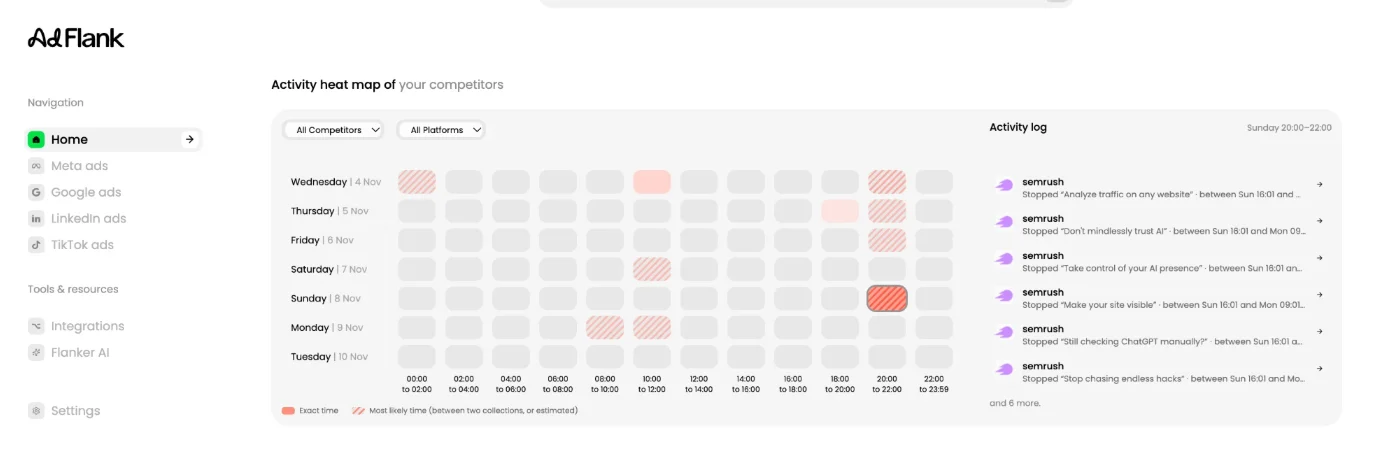
Adflank's Activity Heatmap works this way, and it follows ads on Meta, Google, TikTok and LinkedIn. You open it, pick your rival in the competitor filter and leave the platform filter on All Platforms. A week appears as a grid, with days down the side and two-hour windows across the top. Say Tuesday between 18:00 and 20:00 is shaded. A solid square means Adflank caught the ad at an exact time. A striped square means the most likely time, because the ad showed up between two checks or the time is estimated. The activity log beside the grid says in words what happened, for instance that your rival launched a particular ad that evening.
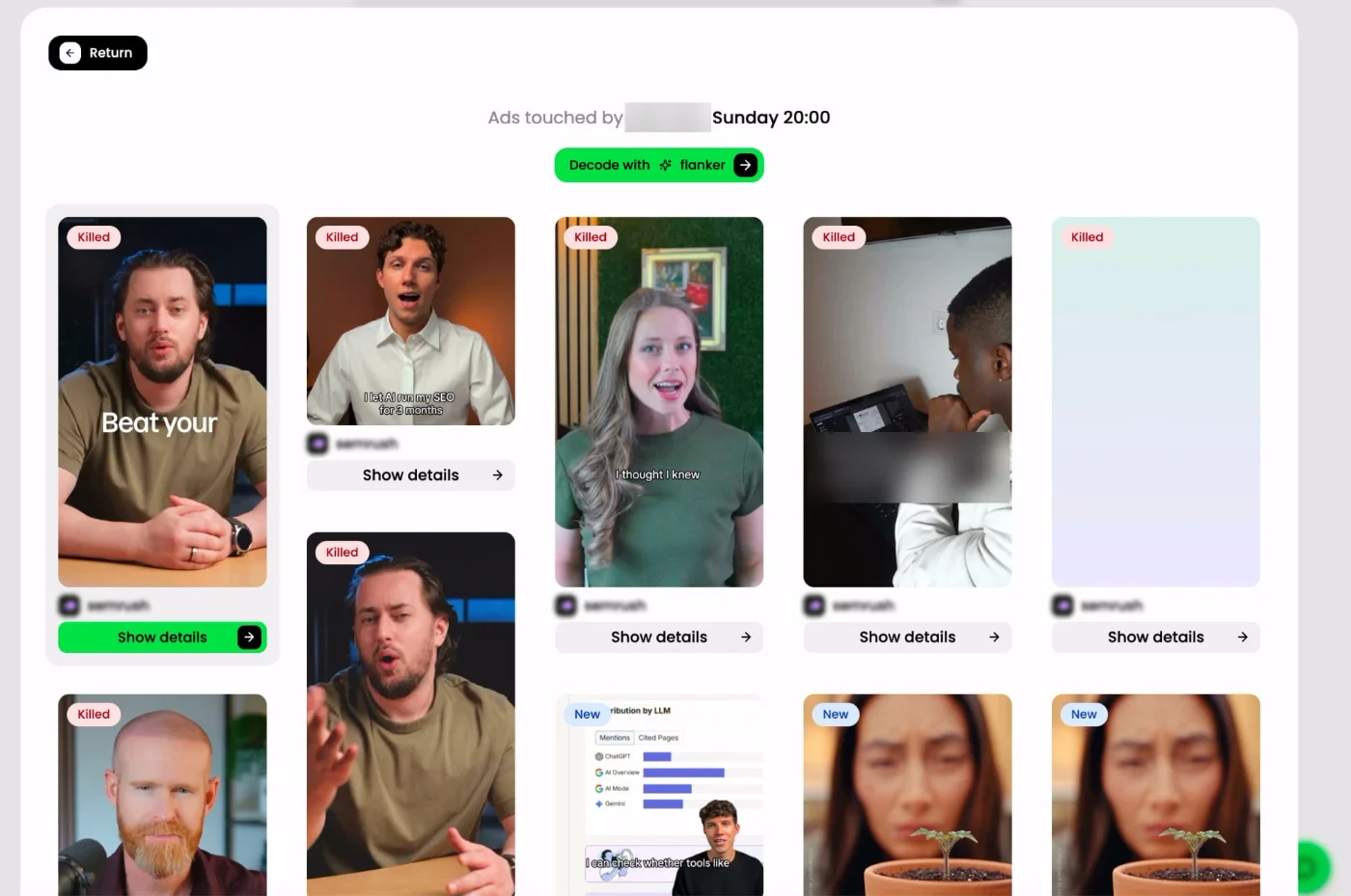
You click the shaded square and see the ads from that window, each tagged New or Killed. Open one and you get its start date, the platforms it ran on, the age groups and regions it reached where the platform publishes them, and the page it sends people to. You can switch the platform filter to see the same week for Meta, Google, TikTok or LinkedIn alone. That's the record your sheet would hold, with the time window instead of only a date.
One limit to know: striped squares are best estimates, not confirmed times.
What should you look for in a competitor's launches?
After a few weeks of records, these patterns are worth checking.
Weekly rhythm. Which weekdays does each rival launch on? If they favor Tuesdays, you can plan your own launches around that.
Bursts. Several new ads in a short span usually mean a campaign. Open them and compare the landing pages and hooks.
Platform order. If a message shows up on one platform before the others, that's probably where they test it. Watch which platform leads.
Quiet periods. A long gap after a burst can mean a test is running and the next move is coming.
Message changes. Compare the hooks of the newest ads with older ones. A new message tells you more than a new image.
You don't need to copy a competitor's schedule. Use it to avoid launching into their loudest weeks, to respond faster to a new angle, or to time your own tests while they're quiet.